
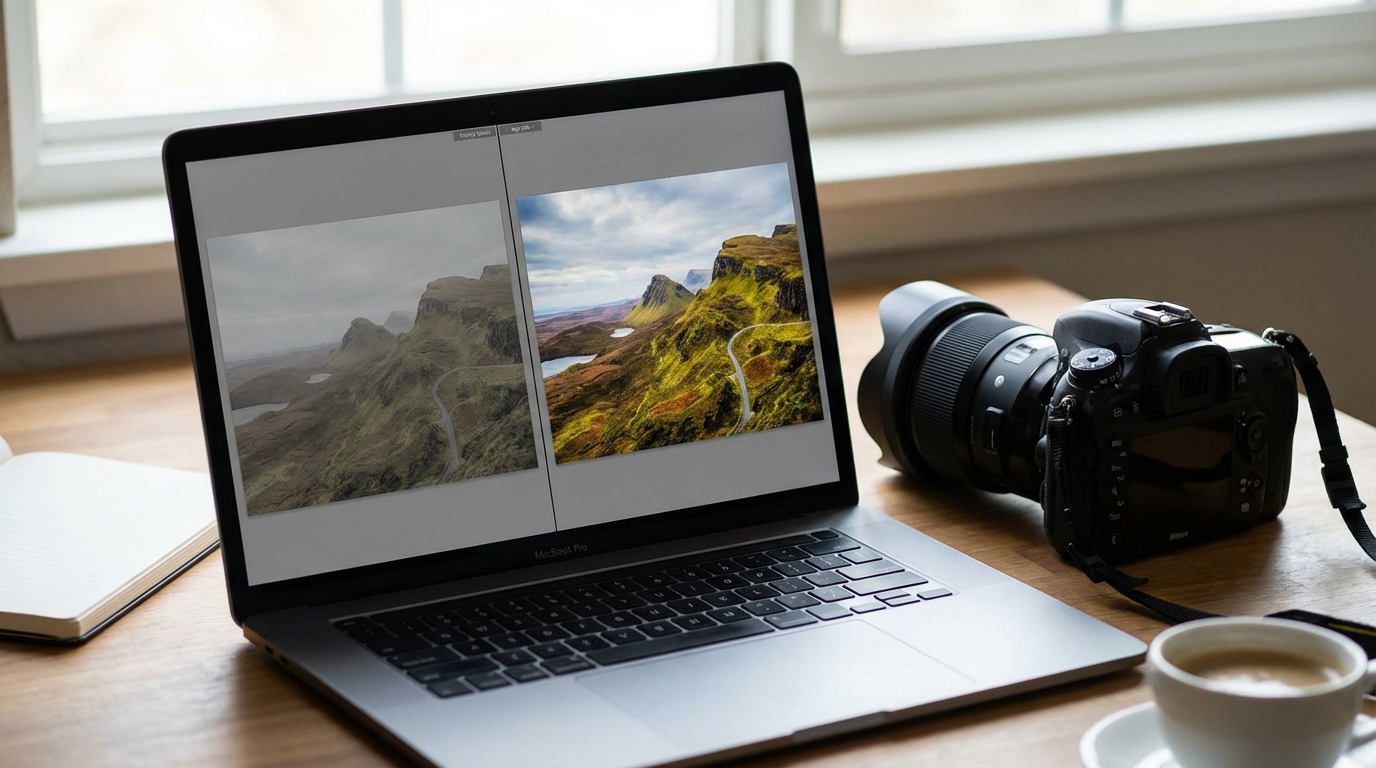
Understanding Digital Image Formats: RAW vs. JPEG
In the realm of digital photography, the choice of image format is a fundamental decision that impacts everything from file size and storage to post-processing flexibility and final image quality. Every time a photograph is taken with a digital camera, the sensor captures light, and that information is then processed and saved into a specific file format. Among the most prevalent formats are RAW and JPEG, each offering distinct characteristics and catering to different photographic workflows and objectives. Understanding the core differences between these two formats is crucial for photographers to make informed decisions about how they capture and manage their images. This exploration will delve into the technical underpinnings of RAW and JPEG, outlining their unique attributes and the implications for digital image creation.JPEG: The Universally Processed and Compressed Format
JPEG, an acronym for Joint Photographic Experts Group, represents the most widely recognized and utilized image format across various digital platforms. Its ubiquity stems from its efficiency and immediate usability. When a camera is set to capture images in JPEG format, an extensive amount of in-camera processing occurs before the data is saved to the memory card.Characteristics of JPEG Files
* **In-Camera Processing:** Upon capture, the camera’s internal processor applies a series of adjustments to the raw sensor data. These adjustments typically include setting the white balance, sharpening details, adjusting color saturation, applying noise reduction, and modifying contrast. The goal is to produce a visually pleasing, ready-to-use image directly from the camera. * **Lossy Compression:** A defining characteristic of JPEG is its use of lossy compression. This means that during the saving process, certain information deemed less critical by the compression algorithm is permanently discarded to achieve a smaller file size. While this data loss is often imperceptible in casual viewing, it can limit the extent of post-processing an image can undergo before artifacts become noticeable. * **File Size:** Due to the aggressive compression, JPEG files are significantly smaller than their RAW counterparts. This allows for a greater number of images to be stored on memory cards and hard drives, and they are faster to transfer and upload. * **Ease of Use and Compatibility:** JPEG is a universally compatible format, viewable on nearly any device or software application without requiring specialized tools. Images are ready for sharing, printing, or immediate online publication directly from the camera. * **Bit Depth:** JPEG images are typically saved with an 8-bit per color channel depth, totaling 24 bits for an RGB image. This means each color channel (red, green, blue) can represent 256 different shades, offering a total of 16.7 million colors. While this is a substantial number, it offers less tonal flexibility compared to higher bit depths.Advantages of JPEG
* **Efficient Storage:** The smaller file sizes conserve storage space on memory cards and external drives. * **Rapid Workflow:** Images are fully processed and ready for immediate use, reducing the need for extensive post-capture adjustments. * **Broad Compatibility:** JPEGs can be opened and viewed on virtually any digital device or software application. * **Faster Camera Performance:** Smaller file sizes mean quicker writing to the memory card, which can allow for longer bursts in continuous shooting modes.Considerations for JPEG Use
* **Limited Post-Processing Latitude:** The data discarded during compression means there is less flexibility to make significant adjustments to exposure, white balance, or color in post-processing without introducing visible image degradation or artifacts. * **Fixed Settings:** Once in-camera processing decisions (like white balance and sharpening) are applied, they are permanently baked into the image file. Reversing or significantly altering these can be challenging. * **Compression Artifacts:** Repeated saving of an edited JPEG image, or aggressive post-processing, can exacerbate compression artifacts, leading to a noticeable loss of detail and introduction of blocky patterns.RAW: The Unprocessed Sensor Data
In contrast to JPEG, RAW is not an acronym but rather a descriptor indicating that the file contains the “raw,” unprocessed data directly from the camera’s image sensor. It acts as a digital negative, preserving all the information captured at the moment of exposure.Characteristics of RAW Files
* **Unprocessed Data:** A RAW file is essentially a direct dump of the data recorded by the camera’s sensor. It bypasses most of the in-camera processing applied to JPEGs. This means that white balance, sharpening, contrast, and color saturation are not permanently applied but rather recorded as metadata that can be adjusted later in specialized software. * **Minimal or Lossless Compression:** Most RAW formats employ either no compression or a lossless compression method. Lossless compression reduces file size without discarding any image data, ensuring that every piece of information captured by the sensor is retained. * **File Size:** Given the comprehensive data retention and minimal compression, RAW files are significantly larger than JPEGs. This necessitates more storage space and can impact the number of images that can be held on a memory card. * **Requires Processing:** RAW files are not immediately viewable or usable in their native state on most standard image viewers. They require dedicated software, often referred to as a RAW converter (such as those included with professional editing suites or provided by camera manufacturers), to interpret and render the image data into a viewable format. This process is commonly known as “developing” the RAW file. * **Higher Bit Depth:** RAW files typically record image data with a 12-bit or 14-bit per color channel depth, sometimes even 16-bit. This translates to 4,096 to 16,384 distinct shades per color channel, yielding billions of potential colors. This expanded tonal range provides immense flexibility for precise adjustments and smoother gradations in tones and colors.Advantages of RAW
* **Maximum Post-Processing Flexibility:** The unprocessed nature and high bit depth of RAW files provide an unparalleled degree of control over image adjustments during post-processing. Photographers can significantly alter exposure, white balance, color, contrast, and sharpening without degrading image quality. * **Greater Recoverable Detail:** RAW files retain more information in highlight and shadow areas that might appear clipped in a JPEG. This allows for more effective recovery of detail in underexposed shadows or overexposed highlights. * **Precise White Balance Adjustment:** White balance can be set or refined with great accuracy after the fact, treating the initial in-camera white balance setting as a suggestion rather than a fixed value. * **Superior Image Quality Potential:** With all the sensor data preserved, RAW files offer the highest potential for producing images with accurate colors, smooth tonal transitions, and fine detail. * **Non-Destructive Editing:** Adjustments made to a RAW file in a converter are typically non-destructive; they are saved as instructions in a sidecar file or within the RAW file’s metadata, leaving the original sensor data unaltered.Considerations for RAW Use
* **Larger File Sizes:** The substantial file sizes demand more memory card capacity and greater storage solutions on computers. * **Slower Workflow:** RAW files require an additional step of post-processing (“developing”) before they can be used, shared, or printed. This adds time to the overall workflow. * **Slower Camera Performance:** Larger file sizes mean slower writing speeds to memory cards, which can reduce the camera’s buffer capacity and continuous shooting frame rate. * **Specialized Software Required:** RAW files cannot be viewed or edited with standard image software; specialized applications are necessary.Key Technical Distinctions Summarized
The fundamental differences between RAW and JPEG formats can be distilled into several key technical distinctions: * **Data Retention:** RAW files retain all original sensor data, while JPEG files discard some information through lossy compression. * **In-Camera Processing:** JPEG files undergo extensive in-camera processing, whereas RAW files store unprocessed sensor data with minimal or no in-camera adjustments applied. * **File Size:** RAW files are significantly larger due to their comprehensive data retention and minimal compression, while JPEG files are much smaller. * **Dynamic Range and Bit Depth:** RAW offers a wider dynamic range and higher bit depth (e.g., 12-bit or 14-bit), providing more tonal information and color depth compared to JPEG’s 8-bit depth. * **Post-Processing Latitude:** RAW files provide extensive flexibility for post-capture adjustments, while JPEG files offer limited scope for significant changes without quality degradation. * **Workflow:** JPEG images are generally ready for immediate use, whereas RAW files require an additional “development” stage using specialized software.Conclusion
The choice between shooting in RAW or JPEG ultimately hinges on a photographer’s specific needs, workflow preferences, and the level of control desired over the final image. JPEG offers convenience, efficiency, and broad compatibility, making it suitable for situations where immediate usability and smaller file sizes are priorities, or for photographers who prefer minimal post-processing. RAW, on the other hand, provides maximum image quality potential and unparalleled flexibility in post-production, making it the preferred choice for enthusiasts and professionals who demand the highest degree of control and are willing to invest time in a more elaborate workflow. Understanding the inherent nature of each format empowers photographers to consciously select the option that aligns with their creative vision and technical requirements, ensuring their digital images capture and convey their artistic intent effectively.Frequently Asked Questions (FAQs)
**Q1: Can a JPEG file be converted into a RAW file?** A1: No, a JPEG file cannot be converted back into a RAW file. Once the data has been lost through JPEG’s lossy compression, that information is permanently discarded and cannot be restored or recreated. A conversion from JPEG to a RAW format would merely encapsulate the already processed and compressed data within a RAW container, without recovering any lost detail. **Q2: Do RAW files require special software to be opened or viewed?** A2: Yes, RAW files generally require specialized software for viewing and editing. Standard image viewers typically cannot interpret the proprietary data within a RAW file. Photographers commonly use RAW converters found within professional editing applications or software provided by camera manufacturers to “develop” these files into viewable and editable images. **Q3: Does shooting in RAW consume more battery power on a camera?** A3: Shooting in RAW format can potentially consume slightly more battery power compared to JPEG. This is primarily because the camera’s processor needs to handle larger amounts of data and write it to the memory card, which can be a more intensive operation. However, the difference is often marginal and highly dependent on the camera model and shooting conditions. **Q4: Is it possible to capture both RAW and JPEG images simultaneously?** A4: Yes, many digital cameras offer the option to capture both RAW and JPEG files concurrently with a single press of the shutter button. This provides the flexibility of having a ready-to-use JPEG image for immediate sharing, alongside a RAW file for extensive post-processing if desired, albeit at the cost of significantly larger file sizes per shot. **Q5: Which image format is generally considered more advantageous for creating large prints?** A5: RAW files are generally considered more advantageous for creating large prints. Their higher bit depth and lack of lossy compression mean they retain a greater amount of detail, tonal information, and color fidelity. This allows for more significant adjustments during post-processing and results in cleaner, higher-quality enlargements with smoother gradations and finer details compared to JPEGs, which might show compression artifacts or limitations in tonal range when scaled up.
Diana Miller, is a dedicated nature enthusiast and an outdoor adventurer. She began leading groups for excursions in her teens and never stopped. Following her passion for nature, she gathers her friends for outdoor trips every now and then. And for the last 10 years, she has executed workshops on backpacking, snow kayaking and traveling that included her main motive of lightweight packing while outdoors. During leisure, she loves planning for her next adventure.